


A Two-Step Authentication Process Integrated with Randomised PIN Entry Keypad and Keyboard - R.P.E.K.
- JBINZALA

- Jun 6, 2017
- 15 min read
This paper is an advancement of my Thesis titled "ADDITIONAL SECURITY COUNTER MEASURES FOR MOBILE BANKING APPLICATIONS AND OTHER DEVICES" submitted for my final year project during my Bachelors Degree (Hons) in Computer Security and Forensics where I created a two-step authentication system for mobile banking and application use. Using a 3x3 randomized PIN entry matrix and the standard norm memorable word authentication process. This thesis was submitted to my university on Friday 5th May 2017. My final year project was supervised by Dr Ali Mansour, Senior Lecturer in Computing and Information Systems, PhD, BSc (Hons), CEng, FBCS, CITP, FHEA, CEH, CSTA, MCSE, MCSA, PCE, CertEd, at the University of Bedfordshire.
PLEASE NOTE: All information and designs / material in this article is copyright © 2017 by Juten Al Ahmed. If any information and designs / material in this article is used without written concent, legal action will be taken against you. For enquiries of use / licensing of R.P.E.K. Authentication please email rpek@jbinzala.xyz

Abstract – Authentication is the first point of contact when trying to retrieve data by authorization. Confidentiality is utmost important when working with personal information. Shoulder surfing techniques are one type of social engineering attacks used to steal PINs and Passwords from victims of cybercrime. Compromised information would result in fraudulent activities occurring within the banking industry, mobile phone security, and others. In addition, the breach of privacy is also a major concern as it can lead to bribery or ransom situations. This paper reviews the importance of deterring social engineering techniques of shoulder surfing by using randomised PIN entry keypad and keyboard. The paper also focuses on related work in the current industry and comparison of other published work.
I. R.P.E.K. Introduction
Shoulder surfing is a known social engineering technique used to obtain information from an individual. Shoulder surfing is known to be a very effective way to obtain information, especially in crowded areas. Examples would include standing next to an individual to watch them typing in their PIN on the phone or ATM machines [1]. To counter this social engineering technique, it is recommended to shield your information while inputting data [2].
This paper focuses on deterring PIN numbers and passwords from being obtained through digital use. Therefore, the paper also demonstrates a new method and proof of concept to counter shoulder surfing attacks and tail gaiting, by using randomised PIN entry keypad and keyboard for passwords.
Furthermore, an in-depth analysis of the artefact discussing the test results of using the authentication system by members of the public.
The paper is structured as follows:
Section II Outlines some of the related work while
Section III Discusses the proof of concept and tools used to test the artefact.
Section IV Outlines the use of the Randomised PIN Entry Keypad & Keyboard design concepts.
Section V Discusses the results obtained from testing the artefact by members of the public. An evaluation of the performance of using the randomised PIN entry keypad and keyboard application is given.
Section VI Comparative outline is shown of this work against others.
Section VII Conclusion with future work stated.
II. Related Work
Kiruthika et al. [3] discussed the creation of a two-step authentication process. SteganoPIN had been created to reduce the amount of attacks which are occurred by social engineering techniques like shoulder surfing. SteganoPIN first allows the user to input the users PIN with number ranging from 0-9 and then the user can also use several punctuation characters. This would be a one-time pin (OTP). Once that has been authenticated, the user must enter the real PIN. This makes SteganoPIN a two-step authentication process using an OTP and a long term pin.
Johnson [4] had applied for a patent which uses wireless communication to a door lock using a wireless keypad to input the users PIN. The main objective of this authentication process is to have an encrypted wireless authentication process which involves the Keypad being acknowledged via Bluetooth frequency.
Current Banks
Banking is the main sector of this randomised PIN keypad and keyboard. Currently, Barclays Bank only uses a 5-digit PIN to enter into the user’s bank account [5]. In comparison to the randomized PIN keypad, the Barclays Bank Mobile Banking application does not deter social engineering due to the 4 by 3 matrix it currently has [6]. This allows any observer using shoulder surfing techniques to easily see where the user’s fingers tap to easily obtain the PIN.
Lloyds Bank [7] is currently using only a memorable word authentication process which asks the user to input 3 characters of the memorable word they have chosen. This allows users to input 3 different characters which are very hard to figure out, however in comparison to the randomised PIN keypad authentication system, due to the fact it is a two-step authentication process, this not only makes it secure; however, increases the security due to the fact it deters social engineering techniques of shoulder surfing.
These are the two types of authentication processes the majority of banks use. Either one of each. However, in regard to the artefact of two-step authentication including the randomised PIN, no other banks use this authentication design and process.
Tesco Bank [8] have started to use biometrics for the authentication process with a 5-digit PIN like Barclays bank as a back-up in case the fingerprint is not recognised. This makes the whole process of authentication much more difficult for someone trying to obtain the passcode or PIN as there is not one displaying , instead a fingerprint authentication UI. This is also a very convenient way for a user to login to the users account. Due to the fact Tesco uses both biometrics and a PIN as a back-up, this essentially makes this authentication process a two-factor authentication process. However, both are not required to log in into the account. Furthermore, there are ethical issues involved regarding the biometrics authentication system. Some users might not have fingers, in addition, medication, injuries, dry hands, etc. also alter the fingerprint which would make this feature for some users obsolete.
III. Proof of Concept
The artefact was developed using Android Studio and programmed in Java. The aim was to demonstrate a realistic approach of how the authentication process would be used in the real world. For example, within banking applications, mobile phone, tablets, and digital LCD displayed door locks, safe locks, user authentication on GUI access to internet pages. In addition, having a similar program to use as for the authentication process as a one step authentication process using either the PIN or Keyboard concept.
Exploring the effectiveness of the artefact’s purpose, a sample of 100 public individuals were surveyed anonymously to complete a questionnaire with 5 questions to determine if the authentication process would be of use for the public. The application was created for mobile device use to demonstrate the artefact for the public to use to gather data regarding customers’ ease of use, security level, preference of authentication processes, and recommendations. In addition, a pool of 42 individuals were asked to try and determine which numbers and password characters were inputted by 2 spectating individuals. These two individuals job were to try and imitate a shoulder surfing attack to try and withdraw the data inputted into the authentication page. This was monitored whilst users entered their PIN and Password when logging in to try and gather accurate findings regarding effectiveness of the proof of concept.
All 42 individuals were asked to use this authentication method to further this research anonymously as well, with the intention of gathering data regarding the amount of time it takes to get into the account page, how many times the user made mistakes while trying to login, and finally how long it took the user to input their password and PIN using the new keyboards. The pool was made of 42 individuals due to the fact 6 age groups were tested on.
IV. Design of Randomised PIN Entry Keypad and Keyboard (R.P.E.K.)
The artefact (R.P.E.K.) has been developed as a two-factor based authentication system. This includes a memorable word system and a PIN entry system. The memorable word system requires the user to input 3 characters (can be more if required) which are always randomised every time the application is loaded, or once logged in. Figures 1 and 2 show an example of random characters being required as the authentication process, also the random characters are different every time the screen is reloaded.

[Figure 1 – GUI of Page Design & Randomised Keyboard Design for Memorable Word is copyright © 2017 by Juten Al Ahmed]

[Figure 2 – GUI of Page Design & Randomised PIN Entry Design 4x4 Matrix with Special Characters is copyright © 2017 by Juten Al Ahmed]
Additionally, the PIN entry segment requires the user to input 6 digits. Once both the PIN and memorable word hold the correct values, the user would be logged into their account automatically (with no enter key required). The latter can be changed if needed.
The memorable word segment was created with 2 randomised sections. As mentioned above, the initial randomisation of the required characters (in relation to the memorable word created). In addition, a randomised keyboard as demonstrated in Figure 1 . This not only eliminates shoulder surfing attacks and protects the victim’s information from being stolen, but also, anyone trying to retrieve fingerprints from an LCD screen to try and crack the password to enter a secured premises for example. There is no way someone could try and crack the user’s password as the fingerprints clicked on the keypad would always be on random positions.
The PIN keypad, shown in Figure 2, was created using a 4x4 matrix to increase the complexity of this segment of the authentication process. The artefact is made up of numbers 0-9, and the characters £, $, !, *, &, and #. The characters have been placed on this segment of the authentication process as decoys to confuse the shoulder surfer or anyone who tries to input a PIN.
R.P.E.K. was created as a single page authentication system to keep it simple and user friendly with positive colours. Additionally, having a single page, the 2-step authentication process allows the user to be able to input data faster, as the user can see exactly what information they need to input rather than authenticating from one page to the next authentication page. This design also makes users feel like they are using a simplistic authentication process when it as actually more complex and secure than others currently in use. The design and the randomisation of the keypad, and keyboard are the key concepts within the artefact.
V. Results and Evaluation
The results from the artefact’s testing are very interesting. 7 individuals per age group of 6-15, 16-25, 26-35, 36-45, 46-55, 56+ were tested with various methods. To gather segments of the data, the artefact was programmed to monitor statistics of attempts of login. All relating to time, measured in seconds. This was then averaged out. Data was collected by allowing each user 3 attempts to login to try and gain the most accurate and reliable results. In total, 126 attempts to login was made by all age groups. All users could register, and create their own accounts to create a realistic authentication approach where it would provide accurate data in regards to the users using their own specific memorable words and PINs.
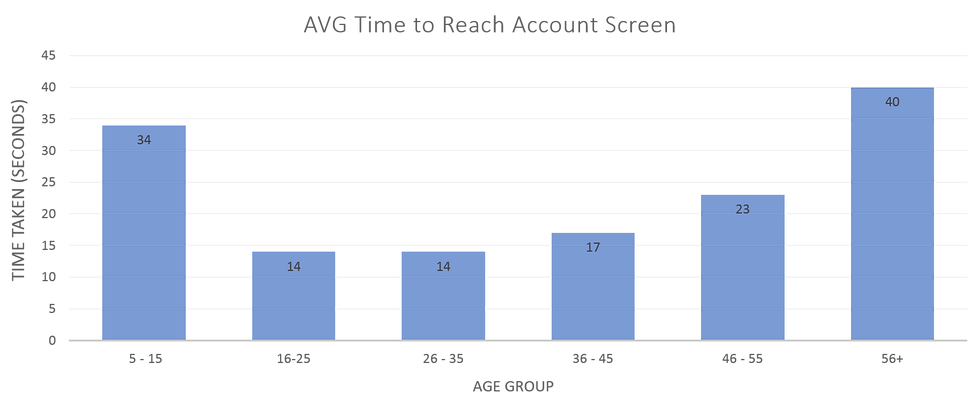
[Figure 3 - Time Measure Rate (Average)]
Figure 3 displays statistics created by the artefact to demonstrate the average time it took everyone to login to their account. As seen above, on average it took 34 seconds for 5-15 yr/o to login to this authentication process (both the PIN and Memorable Word), 14 seconds for 16-25 yr/o, 14 seconds for 26-35 yr/o, 17 seconds for 36-45 years old (yr/o), 23 seconds for 46-55 yr/o and finally 40 seconds for 56+ yr/o. To calculate the average seconds taken to login for each age group, a formula was used: Total Number of Seconds to Login / 21 Total attempts = average time taken to login to account.
In figure 3 we can see the younger the age the more time and thinking the individual had to perform. Age groups between 16-35 had 14 seconds which shows a similar mental capacity. 36-55 shows a slight increase in time. Therefore, suggesting the older a person gets the more time they are taking. Finally, 40 seconds for 56+ yr/o members suggest the user is taking a significant amount of time. This can be related to eye sight issues, memory issues or lack of understanding.
![[Figure 4 – Incorrect Login Attempts]](https://static.wixstatic.com/media/5aa5e5_66b971f4f03b403686add4c9221137e3~mv2.png/v1/fill/w_980,h_406,al_c,q_90,usm_0.66_1.00_0.01,enc_avif,quality_auto/5aa5e5_66b971f4f03b403686add4c9221137e3~mv2.png)
[Figure 4 – Incorrect Login Attempts]
Figure 4 demonstrates the amount of incorrect login attempts a user had entered per age group. As each individual had 3 attempts to successfully login, users aged 5-15 failed to login 7 out of the 21 attempts. Therefore, as displayed in Figure 3 the amount of time taken to login to the account was significantly higher than other age groups. This makes the ratio of fail attempts to successfully login 1:3. 1 every 3 attempts was failed by a 5-15 yr/o.
However, both 16-25 and 26-35 had no failed attempts. This suggests the user’s mental capacity is higher and the users in this age group have a better memory and understanding of the concept.
Age group 36-45 had 2 failed attempts making their ratio approximately 1:11 attempts are failed. However, 46-55 yr/o users have the ratio of 1:7 attempts are failed, therefore having to re-enter their details.
Interestingly, 56+ users did not have any incorrect attempts. However, the correlation between having a 0:21 ratio to Figure 3 clearly demonstrates the elder members used more time to make sure they got the information correct first time.

[Figure 5 - Average Time Taken to Input Correct PIN]
Figure 5 demonstrates the average time taken to enter the correct PIN from the randomised PIN entry keypad and the average time taken to input the correct password characters for the memorable word. This test was created to specify which section of the authentication process takes longer to process and authenticate.
Figure 5 demonstrates on average the time taken to enter the correct PIN was 9 seconds for 5-15 yr/o and 25 seconds to enter the memorable word. 4 seconds for both 16-25 and 26-35 yr/o and 10 seconds to input correct memorable word characters. 5 seconds for 36-45 and 46-55 yr/o to enter the correct PIN, however 36-45 yr/o took 12 seconds for the correct memorable word and 46-55 yr/o took 17 seconds. 56+ yr/o took 13 seconds for the PIN input and 27 seconds for the memorable word.
These statistics show a straight correlation between the PIN taking a shorter time than the Memorable Word input. This would be due to the fact the memorable word is much more difficult to remember specific characters due to the initial randomisation of the characters requested on the screen. Subsequently, the randomised keyboard increases the amount of time taken to visually see the characters to input.
On the other hand, as evidence provides, Figure 5 demonstrates people aged 16-35 took significantly less time to authenticate themselves into the application than all other age groups. Furthermore, 14 second total to authentication a user on average through 3 tries, is not a negative figure as the cons of having a secure authentication process which eliminates the threat of shoulder surfing attacks is much more valuable.
There is also a correlation between, the youngest having the 2nd highest time and the eldest having the highest time to authenticate. This would be due to the fact the younger group might not have understood how the authentication process works correctly, as evidence from Figure 4 demonstrates the youngest group were the group whom had the most incorrect attempts to login. Whereas the eldest group took longer but had no incorrect login attempts. This could be argued that processing the memorable word and characters needed to input could have taken a longer time to recall.
Regarding how effective this authentication process is when being used. A test was conducted regarding a live experiment of have a person shoulder surfing. Results show 0 out of 42 passwords were retrieved due to the fact there is a two-step authentication process in place.
VI. Comparison of other work
Kiruthika et al. [3] had published a paper, based on the creation of a two-step authentication process. SteganoPIN have been able to create a strong authentication. This system has an advantage of not only allowing the user to use digits ranging from 0-9 but another 10 punctuation symbols. This provides a better statistical advantage for the user to being protected regarding a hacker trying to break the passcode. However, the issue here is the fact that it still does not really deter social engineering techniques like shoulder surfing as the user’s passcode may still get stolen. The only thing trying to protect the real password is the OTP.
In comparison to the artefact, having a 2-step authentication process is very similar to this SteganoPIN publication. However, the whole concept is different. SteganoPIN wants the users to use an OTP whereas the artefact requires 2-steps to be authenticated every time accessed. Furthermore, the artefact uses a randomised memorable word system asking for different letters of the memorable word, a randomized keyboard to input the memorable word, a randomised PIN which also uses different characters to confuse the unauthorised person(s).
On the other hand, the artefact does the same job, in the sense of protecting data. However, the artefact allows the user to create a memorable word which would make it more difficult for the shoulder surfers to withdraw the information as not only does the social engineer have to try and obtain the full word of the memorable word, but the engineer must also obtain the PIN. All the validations prevent this.
As Johnson [4] has created an authentication process using a Bluetooth frequency to unlock doors after inputting the PIN. The result has been effective in unlocking a door however, in summary this is very different to the artefact created as a two-step authentication process is very versatile for many different authentication situations. RPEK can be used to authenticate authorised staff / students or whomever using the same process on an LCD monitor at the point of authorisation. An example of using this RPEK would be having a tangible LCD monitor near any door which the person(s) need to authenticate before access.
In comparison from Johnson’s work [4] and the artefact (Figures 1 and 2), the artefact is the clear winner due to the fact it is a two-step authentication process which adds additional security, furthermore, encryption to the traffic can be implemented depending on the use of the authentication process. For example, if it were a bank whom would use this authentication process; banks would have an additional encryption process to allow this authentication to verify a user’s account to withdraw the information required by the user. Furthermore, an example of using the artefact as an authentication process to authenticate a person(s) to a specified locked room would also need a form of encryption on the server where all the credentials are held.
Barclays authentication system is very similar to the artefact. Barclays are currently using a 5-digit PIN authentication system which does not use a randomised keypad. In comparison to the artefact, the artefact is an improved version of this keypad design. Adding additional spaces which have different values rather than the norm of 0-9. In addition, randomising the keypad increases the integrity of the user inputting the password to verify it was the actual user due to the fact the PIN is much more difficult to guess.
In comparison, to Lloyds authentication process, the processes are very alike as the memorable word authentication process was an addition to the whole authentication process for the artefact. However, the difference between Lloyds authentication process and the artefact is the fact the artefact includes both a memorable word authentication page and a randomised keypad. Whereas Lloyds only offers the memorable word system. On the other hand. Overall this makes the artefact more secure in regard to authenticating a user and verifying if it is the correct user trying to access the data.
In comparison to Tesco’s banking authentication system. Tesco has the feature of using biometrics as a 1 step authentication with an additional backup of using a 5-digit PIN. Tesco has done well in this case as the fingerprint is unique to every person. However, ethically if a person(s) did not have a finger print due to medication or the loss of a hand or finger, this would make that feature obsolete. Hence, having a backup process is necessary.
On the other hand, the artefact does not have to deal with any issues of these kinds due to the fact it is a much more secure authentication process as the user must go through 2 steps. This overall does increase the time to login to the account however, this is where the user must understand the importance of data security.
VII. Conclusions and Future Work
The best way to reduce the risk of the shoulder surfing attacks from being successful is to increase the complexity of the randomised PIN entry keypad. Currently, the randomised password keyboard is very difficult to withdraw information from as the survey findings evidently prove. In addition, the findings from the live experiment displayed, 0 out of 42 individuals could guess or obtain the correct PIN and Password. Arguments could be the fact the individuals do not have any experience in performing this type of attack. However, experience is not a concern here as the numbers cannot be identified when inputting the PIN number, furthermore, the complexity of the randomised keyboard derails the social engineer.
Future work would include adding additional characters to the randomised PIN entry keypad to use as a deterrence.
In addition, changing the matrix of the keypad, by adding additional layers would increase the complexity.
Regarding the character values, an increase in values needed to be inputted would also increase the complexity of the authentication process for the social engineer which increase the rate of failed attempts.
References
Darril Gibson. (2016). Available: http://blogs.getcertifiedgetahead.com/understanding-common-attacks/. Last accessed 1st June 2017.
Margaret Rouse. (2005). Available: http://searchsecurity.techtarget.com/definition/shoulder-surfing. Last accessed 1st June 2017.
K.Kiruthika, D.Jennifer, K.Sangeetha, Jackulin.C, R.Shalini. (2016). Available: https://www.ijecs.in/issue/v5-i10/62%20ijecs.pdf. Last accessed 3rd April 2017.
Jason Johnson. (2017). Available: https://encrypted.google.com/patents/US20170109952. Last accessed 25th June 2017.
Barclays Banking Group. (2017). Available: http://www.barclays.co.uk/Helpsupport/Onlinebankingsecurity/P1242657728006 . Last accessed 11th March 2017.
Barclays Banking Group. (2017). Available: http://www.barclays.co.uk/BarclaysMobileBanking/MobileBankingapp/P1242609123821 . Last accessed 11th March 2017.
Lloyds Bank Group. (2017). Available: https://www.lloydsbank.com/online-banking/mobile-banking.asp. Last accessed 10th March 2017.
Tesco PLC. (2017). Available: http://www.tescobank.com/credit-cards/. Last accessed 15 April 2017.


![Bitcoin: A Peer-to-Peer Electronic Cash System by Satoshi Nakamoto [2008]](https://static.wixstatic.com/media/5aa5e5_37885f7a0fad4c15a4022310273a2acd~mv2.webp/v1/fill/w_980,h_551,al_c,q_85,usm_0.66_1.00_0.01,enc_avif,quality_auto/5aa5e5_37885f7a0fad4c15a4022310273a2acd~mv2.webp)
Comments